

Many Solana users believe that once they sell all their tokens, their wallet is fully empty.
In reality, hidden SOL may still be locked inside your wallet — especially if you have traded tokens before.
This article explains why SOL gets locked, how to check your wallet, and how CleanYourSol.com helps users safely reclaim unused SOL with just one click.
Why Is SOL Locked in Solana Wallets?
When you trade on the Solana blockchain, something happens automatically in the background:
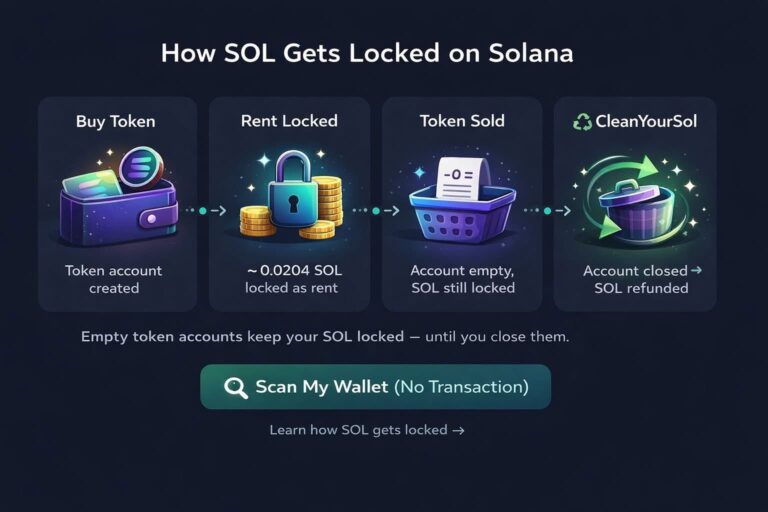
- Every time you buy a new token, Solana creates a token account in your wallet
- To keep that token account alive, Solana locks a small amount of SOL as rent
- The average rent per token account is about 0.00204 SOL
Later, when you sell the token, the balance goes to zero — but the token account remains open.
👉 That means the rent SOL stays locked, even though the token is gone.
If you have traded many tokens (DEX trades, meme coins, NFTs, experiments), your wallet may contain dozens or even hundreds of empty token accounts, each holding locked SOL.
What Are Empty Token Accounts?
An empty token account is:
- A token account with 0 balance
- No longer needed
- Still holding locked SOL rent
- Invisible in most wallets like Phantom or Solflare
These accounts do not close automatically.
Over time, this can add up to a surprising amount of recoverable SOL.
How to Check If You Have Hidden SOL
The easiest way to check is using CleanYourSol.
🔗 Official website:
👉 https://cleanyoursol.com
CleanYourSol scans your wallet and:
- Detects all empty token accounts
- Calculates the total locked SOL
- Allows you to reclaim it safely
No private keys.
No approvals.
No custody.
You simply connect your wallet and view the results.
🎥 Video: How to Claim SOL from Empty Token Accounts
This video visually demonstrates:
- Why SOL is locked
- How empty token accounts are found
- How SOL is returned instantly to your wallet
How CleanYourSol Works (Step-by-Step)
- Connect your Solana wallet
- Phantom, Solflare, Backpack, and more
- Scan for empty token accounts
- Review locked SOL amount
- Click “Claim All SOL”
- SOL is returned directly to your wallet
The process is fast, transparent, and fully on-chain.
Is CleanYourSol Safe?
Yes. CleanYourSol:
- Uses standard Solana instructions to close empty token accounts
- Does not move active tokens
- Does not request wallet permissions
- Only closes accounts with zero balance
This is the same mechanism used by advanced Solana tools — just made simple for everyday users.
Who Should Use CleanYourSol?
CleanYourSol is ideal for:
- Users who traded Solana tokens before
- DeFi and DEX users
- NFT traders
- Old wallets that haven’t been checked in a long time
If you never traded any tokens, your wallet may show nothing to reclaim — which is normal.
Popular SEO Keywords Covered
This article targets high-intent search terms such as:
- claim solana rent
- reclaim sol
- claim locked sol
- solana fee refund
- solana empty token account
- recover sol from wallet
- claim sol from phantom wallet
- solana rent explained
- CleanYourSol
Final Thoughts
SOL locked in empty token accounts is one of the most overlooked issues on Solana.
Before creating a new wallet or assuming your funds are gone, it’s worth checking.
👉 Visit https://cleanyoursol.com
Scan your wallet and reclaim what already belongs to you.

0 Comments